Graphics Programming - Part 1: Getting Started
I have always been really interested in video games, and at one point I wanted to go beyond just playing games and actually learn how to make them. While exploring all the different technologies involved in game development, I stumbled across shaders and graphics programming. At the time I honestly wasn’t that interested in it, but later I came back out of curiosity and started digging deeper. Fast forward a bit, and now shaders are something I use heavily in my research projects.
If you’re trying to get started with shaders and graphics programming, there are a lot of resources out there. Tutorials, engines, APIs, frameworks, YouTube videos, blog posts… the internet really has everything. Which sounds great until you’re a beginner and suddenly have no idea where to actually start. I definitely ran into a bit of “paralysis by analysis” from having too many options.
So here I am, contributing even more shader content to the internet and adding to the confusion
This series is basically going to be my notes and experiences learning graphics programming as a beginner. I’ll also share the resources, tools, and tutorials that helped me along the way because some of them were genuinely super useful when starting out.
Getting Started
Before I dump everything I know here, I’d recommend checking out these blogs first to get an idea of the different paths people take into graphics programming, along with some useful prerequisites:
- The path to learn graphics programming
- Getting Started In Computer Graphics
- How to Start Learning Computer Graphics Programming
But fear not my friends, I’m not just going to throw a bunch of links at you and disappear into the shadows. I’ll also share the path I personally followed and the things that helped concepts finally “click” for me.
For me, the best reference to get started was The Book of Shaders . This tutorial/note series will loosely follow the structure of The Book of Shaders, while also including extra explanations, random beginner mistakes, and little bits of information that personally helped me understand things better.
What Even Is Graphics Programming
At a very basic level, computer graphics is simply the process of generating images using a computer.
That sounds straightforward, but unfortunately computers do not actually understand:
- objects
- lighting
- materials
- shadows
- or “cool looking explosions”
A computer ultimately only knows how to manipulate numbers.
Meanwhile, our monitor or screen only knows how to display millions of tiny colored dots called Pixels.
So graphics programming is really the process of using mathematics, algorithms, and hardware to decide:
Everything we see on a screen, whether it is a video game, a 3D movie, a website, or a simulation eventually becomes pixels.
The challenge is that modern graphics involve a lot of pixels.
For example, a 1920x1080 display contains over 2 million pixels. If a game runs at 60 FPS, the system may need to update those pixels 60 times every second while also calculating:
- lighting
- shadows
- textures
- reflections
- animations
- particles
- post processing effects
- and more
That quickly becomes an enormous computational problem.
This is why Graphics Processing Units (GPUs) exist. Unlike CPUs, which are optimized for a smaller number of complicated sequential tasks, GPUs are designed for massively parallel workloads where millions of similar operations can happen simultaneously.
Have a look at this pipeline analogy to get a better idea about parallel processing of the GPU.
Graphics rendering fits this model perfectly because many pixels can be processed independently at the same time.
But the GPU still needs instructions telling it how graphics should be processed.
That is where Shaders come in. Shaders are small programs that run directly on the GPU and allow developers to customize different stages of the graphics rendering process.
The Graphics Pipeline
Now that we have a rough idea of what shaders and why GPUs exist, let’s look a little under the hood and see how graphics actually make their way onto the screen.
To understand shaders properly, it helps to understand the graphics pipeline, which is the step-by-step process the GPU follows to transform data into the final pixels you eventually see on your screen.
At a very high level, the graphics pipeline is the process used by the GPU to transform 3D scene data into the final 2D image displayed on your screen.
You can think of the graphics pipeline as an assembly line for graphics
Each stage of the pipeline performs a very specific job, and the output of one becomes the input for the next.
Because many of these operations can happen independently, GPUs can execute huge numbers of them in parallel, which is why graphics rendering is so fast compared to running everything on the CPU.
Some stages of this pipeline are programmable using shaders, which allow developers to customize how graphics are processed.
Stages of the Graphics Pipeline
Let’s go through the major stages of the graphics pipeline one by one.
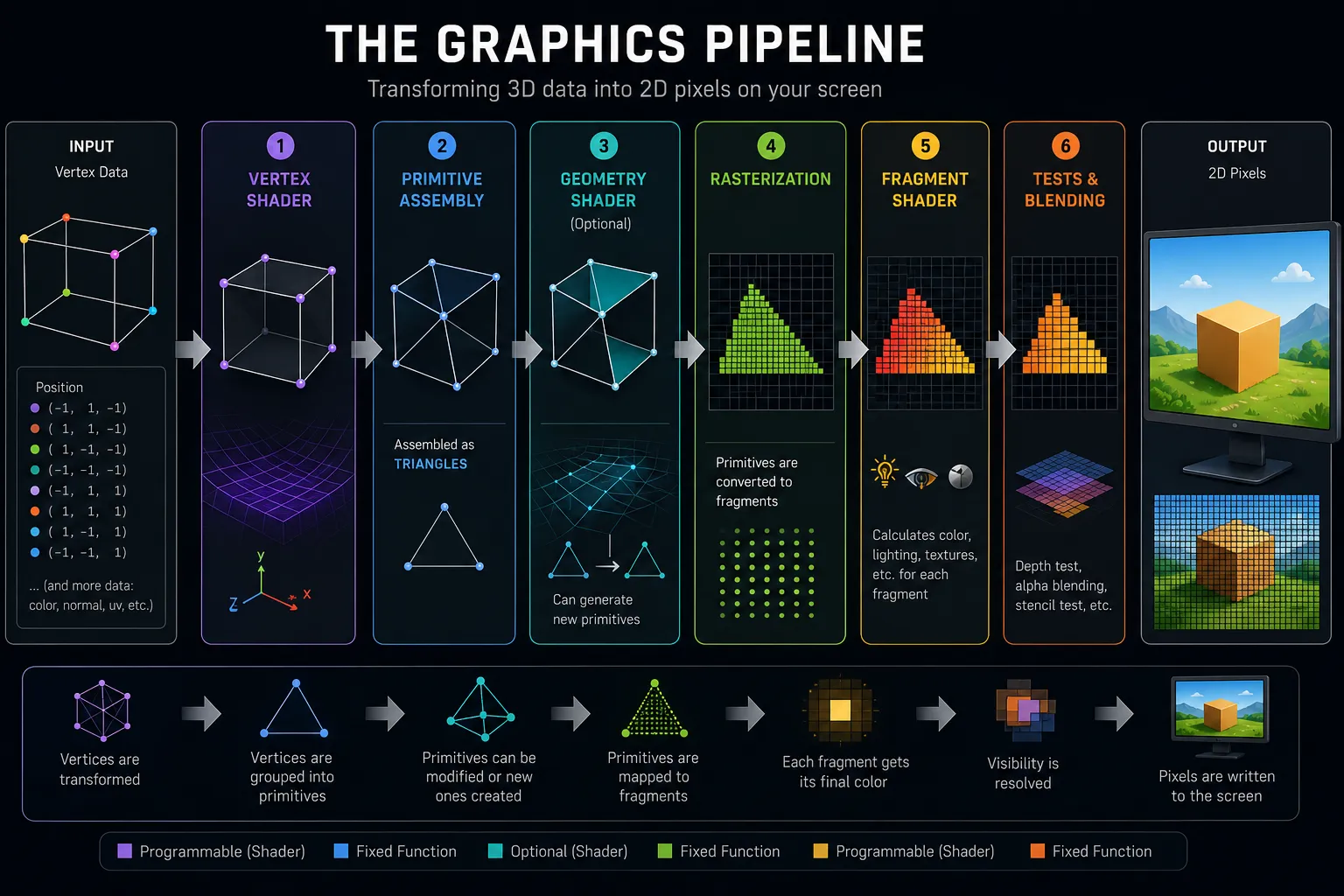
Image generated using ChatGPT
1. Vertex Processing
Everything usually begins with vertices.
This stage is programmable using a Vertex Shader
2. Primitive Assembly
Once vertices are processed, the GPU groups them together into basic shapes called primitives.
Triangles are especially important because most modern 3D graphics are ultimately built from triangles.
Triangles are especially important because most modern 3D graphics are ultimately built from triangles.
3. Geometry Processing
Some pipelines include an optional stage called the Geometry Shader, which can modify existing shapes or even generate entirely new geometry.
This stage is less commonly used than vertex and fragment shaders but can still be useful for special effects and procedural geometry generation.
4. Rasterization
At this stage, the GPU converts shapes into fragments that correspond to regions of the screen.
This is where the GPU determines:
Which pixels are covered by this shape?
A triangle is no longer just mathematical coordinates now, it starts becoming actual screen space data.
5. Fragment Processing
The fragment stage determines the final appearance of the fragments before they become visible pixels.
This stage is programmable using a Fragment Shader
This is where many visual effects happen:
- lighting
- textures
- shadows
- reflections
- gradients
- post-processing effects
The fragment shader usually calculates the final color of each fragment.
6. Testing and Output
Before pixels are finally drawn to the screen, the GPU performs several tests.
For example:
- depth testing
- transparency blending
- stencil testing
These help determine:
- which objects appear in front of others
- which fragments should be discarded
- how transparent objects should blend together
Finally, the resulting pixels are written to the screen.
Now that we know where the shaders apply in the graphics pipeline and the purpose of shaders, let’s try our first shader in the next article.